Sections
On this page
Links and "Where used"
How to connect a file to a task, document or harness run, how "Where used" works, and what happens to references on rename, new version and deletion.
A file in Artifactory matters not on its own but because of the work it belongs to. That's why every file has a "Where used" section: a list of tasks, documents and harness runs that reference it. The connections appear on their own — mentioning the slug is enough.
Three kinds of connection
| Kind in "Where used" | Where it comes from |
|---|---|
| mention | The slug AF-ARTF-12 appears in a node's title or description, in any of its comments, or in a document's text |
| reference | An agent explicitly added the file to the node's references (the set_references tool) |
| result | A harness run step submitted the file as its result |
Each row shows the source's slug and title; clicking it opens the task, document or run.
Mentions
To connect a file to a task, write its slug in the text — by hand or with the "Attach from Artifactory" button:
[blocker] Fails on the client's data — dump in AF-ARTF-31, log in AF-ARTF-32.What happens:
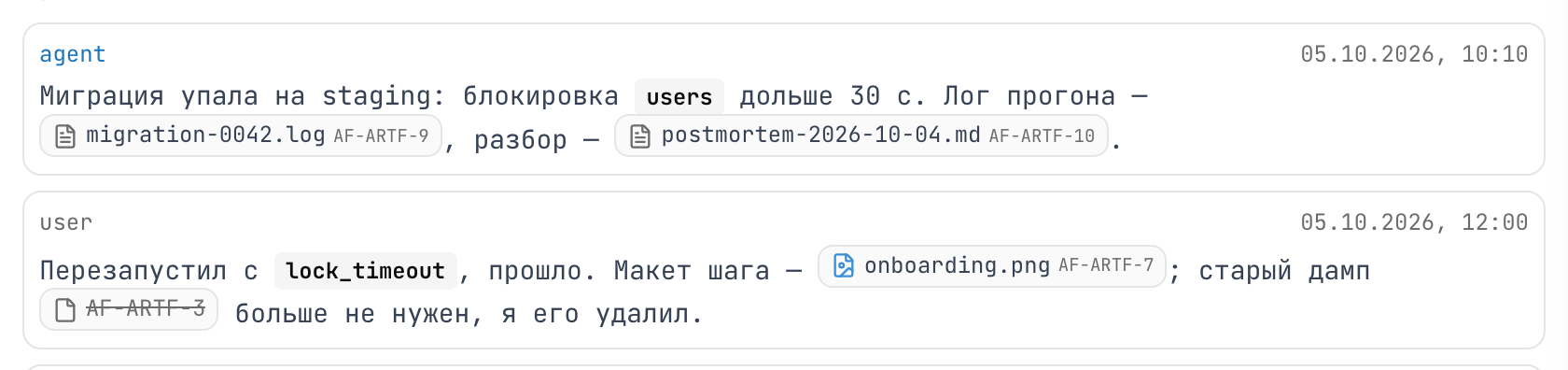
- In the comment text, both slugs become chips with an icon and the file name.
AF-ARTF-31andAF-ARTF-32listAF-TASK-42under "Where used" with the kind "mention".- If you later remove the slug from the text or delete the comment, the connection disappears on its own.
Rules:
- The slug must be a separate word. Slugs inside code blocks and inside existing links are left alone.
- Only slugs from your own project count.
XY-ARTF-5from another project stays plain text. - The connection doesn't appear instantly, but a few seconds after saving.
What happens on changes
| What you did to the file | What happens to references |
|---|---|
| Renamed or moved it | Nothing — the slug is the same, references work |
| Uploaded a new version | Nothing — references point to the file, not a version; the latest one opens |
| Deleted it to the trash | Chips point to the file in the trash; you can restore it and everything works again |
| Deleted it forever | Chips show a struck-through slug — "this file existed but was deleted", not "typo" |
Deleting a file that's referenced
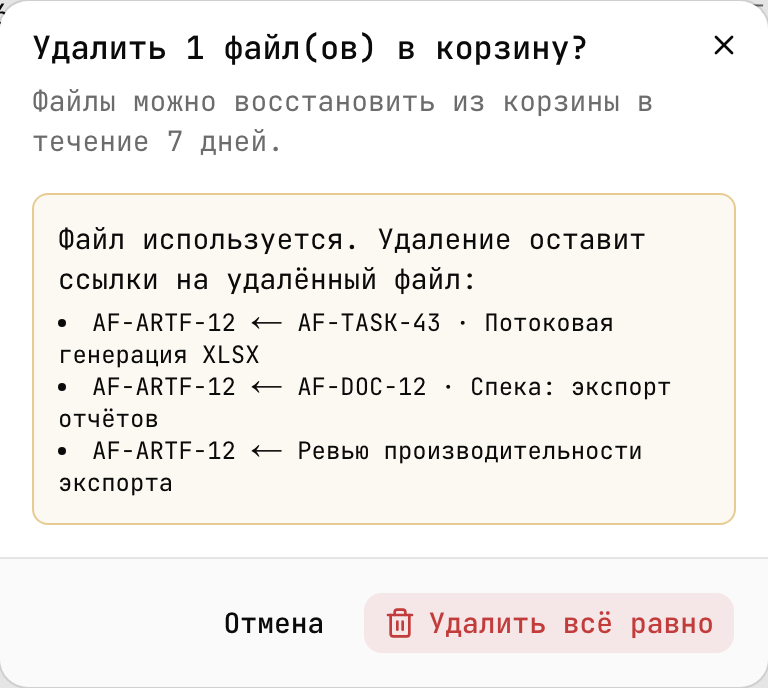
Deleting a file in use requires confirmation:
- On the web, the dialog shows "The file is in use. Deleting leaves references to a deleted file:" and the list of sources up front. The button is "Delete anyway".
- Over MCP,
artifact_deletewithoutconfirm: truerefuses and lists who references the file: "artifact is in use by AF-TASK-1, …; repeat with confirm to delete anyway". - The built-in agent explains the consequences and deletes only after you click "Allow".
This protects against silently broken references: the decision "this task no longer needs the file" should be made by a person.