Sections
Agent: overview
The built-in Flownix agent is a chat assistant that works inside your project: it plans, searches, writes specs and changes the tracker when you ask it to.
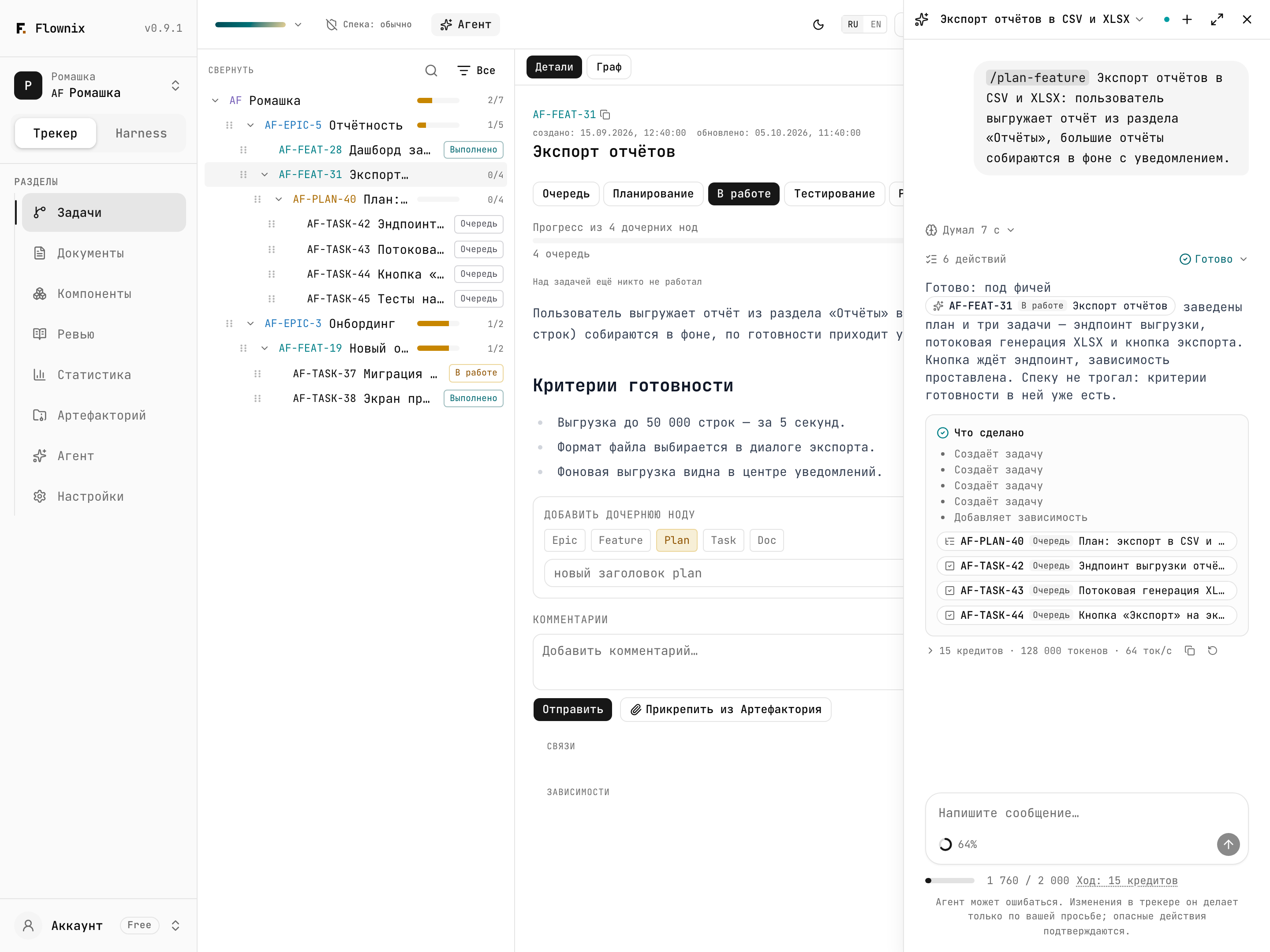
The agent is a chat assistant right in the Flownix web interface. It needs no Claude Code, no Cursor and no MCP token: open a project, click "Agent", and say what you need. The agent sees the work tree, documents, components, artifacts and decision history of the current project and acts in it on your behalf, with your permissions.
What it does
Plans
Breaks an idea down into an epic, features, plans and tasks using the tracker templates, and sets dependencies, tags and components.
Answers questions about the project
"What's in progress right now?", "Why did we choose Postgres?", "Which tasks touched billing?" — it searches nodes, documents, comments and artifacts by meaning and answers with links.
Maintains specs
Writes and edits documents, prepares spec deltas and submits them to you for approval. A person always approves.
Changes the tracker on request
Creates and moves nodes, changes statuses, writes comments, links tasks. Only when you ask — and deletion and other risky actions only after you click "Allow".
Works with files
Reads text files from Artifactory, saves its own reports there, and gives download links for everything else.
Shows what it did
Every tool call appears in the feed with its arguments and result, and each reply ends with a "What was done" summary linking to the changed entities.
What it is not
The built-in agent is a specialist in your Flownix project, not a general-purpose assistant and not a programmer.
- It has no access to code. No repository, no file system, no command line. It can't
write code, run tests or commit — for that you still connect an external agent over
MCP and give it
/execute-task. - It stays inside the project. Everything it reads and changes belongs to the current project. It can't create projects or organizations.
- It doesn't make decisions for people. You approve spec deltas, you start harnesses, you confirm deletions.
- It doesn't chat about anything else. The agent politely declines questions that are not about Flownix or your project.
Built-in agent or external agent over MCP
| Built-in agent | External agent (Claude Code, Cursor…) over MCP | |
|---|---|---|
| Where it lives | In the Flownix web interface | In your editor or terminal |
| What you need to start | Nothing but access to the project | An MCP token, client setup, skills |
| Code and repository | No access | Full access to your working copy |
| How you pay | Agent credits from your Flownix plan | Your model provider subscription |
| Who sees the conversation | All project members | Only you, in your client |
| Best for | Planning, specs, questions about the project, tracker cleanup | Executing tasks in code, reviewing branches, agent councils |
They don't compete; they work as a pair. The built-in agent helps you break a feature into tasks and write the spec; the external one picks up tasks by slug and implements them in code. Both write to the same tree, so no context gets lost.
Next
- Working in the chat — how to open the agent, manage sessions, invoke skills and answer its questions.
- What the agent can do — the full list of actions, limitations and confirmations.
- Credits and limits — what a turn costs and what your plan includes.
- Use cases — what it looks like on real tasks.