Sections
On this page
Credits and limits
How many agent credits your plan includes, how the cost of a reply is calculated, when the limit resets and what limits apply to a single reply.
The agent's work is paid for with credits. Each reply spends credits depending on how much text the model read and wrote. Credits are personal: the limit is tied to you, not to the project, and applies across all your organizations.
What your plan includes
| Plan | Credits per month | Concurrent replies |
|---|---|---|
| Free | 2,000 | 1 |
| Pro | 20,000 | 3 |
| Team | 40,000 | 5 |
| Enterprise | 40,000 | 5 |
The limit runs per calendar month and resets on the 1st at 00:00 UTC (03:00 Moscow time). Unused credits don't carry over to the next month.
You can check your current numbers in two places:
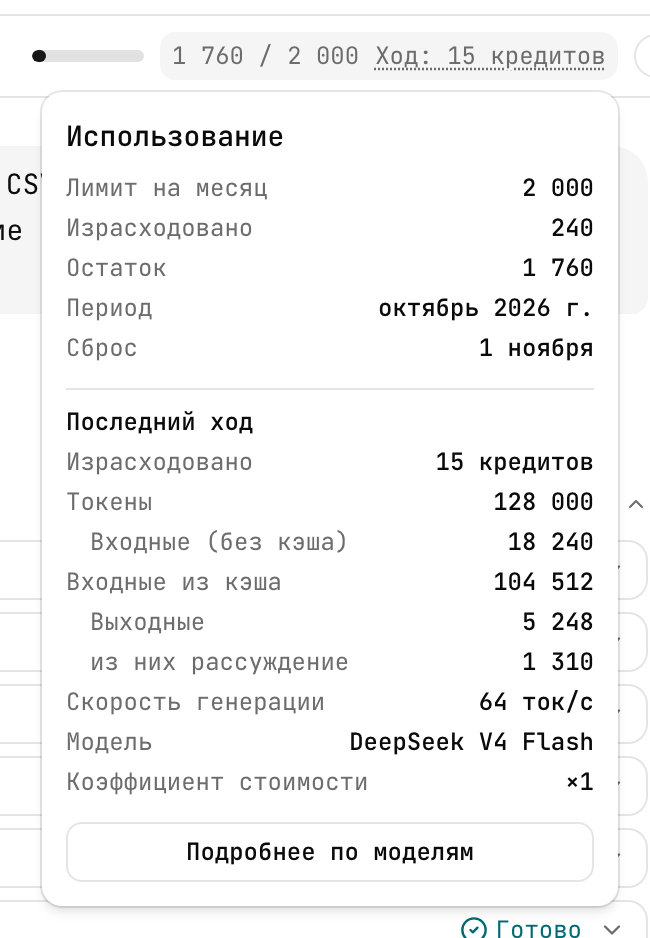
- The credit counter in the agent header: "remaining / limit" and the cost of the last reply. Clicking it opens the "Usage" window: the monthly limit, used, remaining, the reset date and details of the last reply. The "Details by model" button shows the month's usage for each model: turns, credits, tokens, speed.
- Account settings → "Plan and usage" (
/settings/billing): the "Monthly agent credits" and "Concurrent agent turns" rows for each plan.
How the cost of a reply is calculated
The model "reads" the whole conversation and everything the agent found in the project, and "writes" the reply. The volume is measured in tokens (a token is roughly 3–4 characters of text). Credits per reply:
| What | Credits per 1,000 tokens |
|---|---|
| Read for the first time | 1 |
| Read again (from cache) | 0.1 |
| Written to cache for later replies | 1.25 |
| Written, including reasoning | 2.8 |
The total is multiplied by the model's factor: ×1 for the default model; more expensive ones are labeled "×N cost" in the model picker. Session titles and compaction of long history also cost credits, like regular model calls — their share is usually small.
Rule of thumb. A question about the project with a couple of searches usually costs tens of credits. Breaking a large feature into twenty-odd tasks with a spec costs hundreds. On Free, 2,000 credits are enough to try the agent on real planning; Pro is designed for daily work.
The exact cost of each reply is shown in its footer ("N credits · M tokens"), and clicking the footer expands the breakdown: uncached input, cached input, output, and the reasoning part of the output.
How to spend less
- New topic, new session. Every reply rereads the conversation history, so a long session makes each following reply more expensive.
- Give slugs. "Split
AF-FEAT-12" is cheaper than "split that export feature we discussed": the agent doesn't have to search. - One request per message. The answer to a precise question is shorter, and so cheaper.
When credits run out
- When less than 20% is left, the counter turns yellow and "Credits are running low: N of M" appears.
- When credits are used up, the input field is blocked with the text "Credits are used up. Resets {date}." You can still read sessions as usual.
- A reply already in progress isn't cut off midway because of credits: the limit is checked before a reply starts.
To keep going before the reset, switch to a plan with a higher limit in account settings.
Per-turn limits
A turn is everything the agent does in response to one of your messages. A turn has limits so that a single request can't eat the monthly allowance:
| Limit | Value |
|---|---|
| Steps (model calls) | 25 |
| Time | 15 minutes |
| New tokens | 400,000 |
| Changes in the project | 30 |
| Volume of tool results | 2 MB |
| Length of your message | 16 KB |
If a turn hits a limit, the agent sums up what it has done and offers "Continue" — see Working in the chat. The worst case for one turn is about 400 credits.
Rate and concurrency
- Only one turn runs in a session at a time.
- Across all your sessions, no more turns run at once than your plan allows (table above).
- No more than 10 new turns per minute.
- Up to 500 sessions per author in one project (archived ones count too). When you hit it, delete old ones.
Models and plans
Flownix sets the list of models. Some models may be unavailable on Free — then on selecting one you'll see "This model is unavailable on your current plan. Choose an available model or change your plan." A model with the "Testing" badge is being tested: it may be unstable.